
Looking for a DrinkControl alternative? Modero may be a better fit if detailed alcohol units, calories, and spending are not what you need in the moment. It keeps the job simple: set a plan for tonight, tap once when you have a drink, notice your pace, and review the pattern later.
DrinkControl may still be the better tracker for you. Its current App Store listing focuses on detailed drink data, including alcohol units, calories, costs, calendars, charts, reminders, widgets, and CSV export. If those details help you make decisions, a lighter app would leave out things you value. DrinkControl’s App Store listing is the right source for its current feature set.
Why people look for a DrinkControl alternative
Detailed tracking is useful when you want to know the strength, cost, or calorie content of each drink. But it can also ask you to make more choices while you are trying to stay in a conversation. You may not want to find a drink type, enter a serving, or look at a unit calculation every time a glass is poured.
Sometimes the real question is smaller: “What number did I plan for tonight, and where am I now?” If that is your question, a simple live count may be more useful than a detailed log you inspect tomorrow.
That does not make DrinkControl too complicated. It makes it a different kind of tracker. An alternative is worthwhile when it changes the workflow, not just the colour of the screen.
Modero vs DrinkControl at a glance
| What matters | Modero | DrinkControl |
|---|---|---|
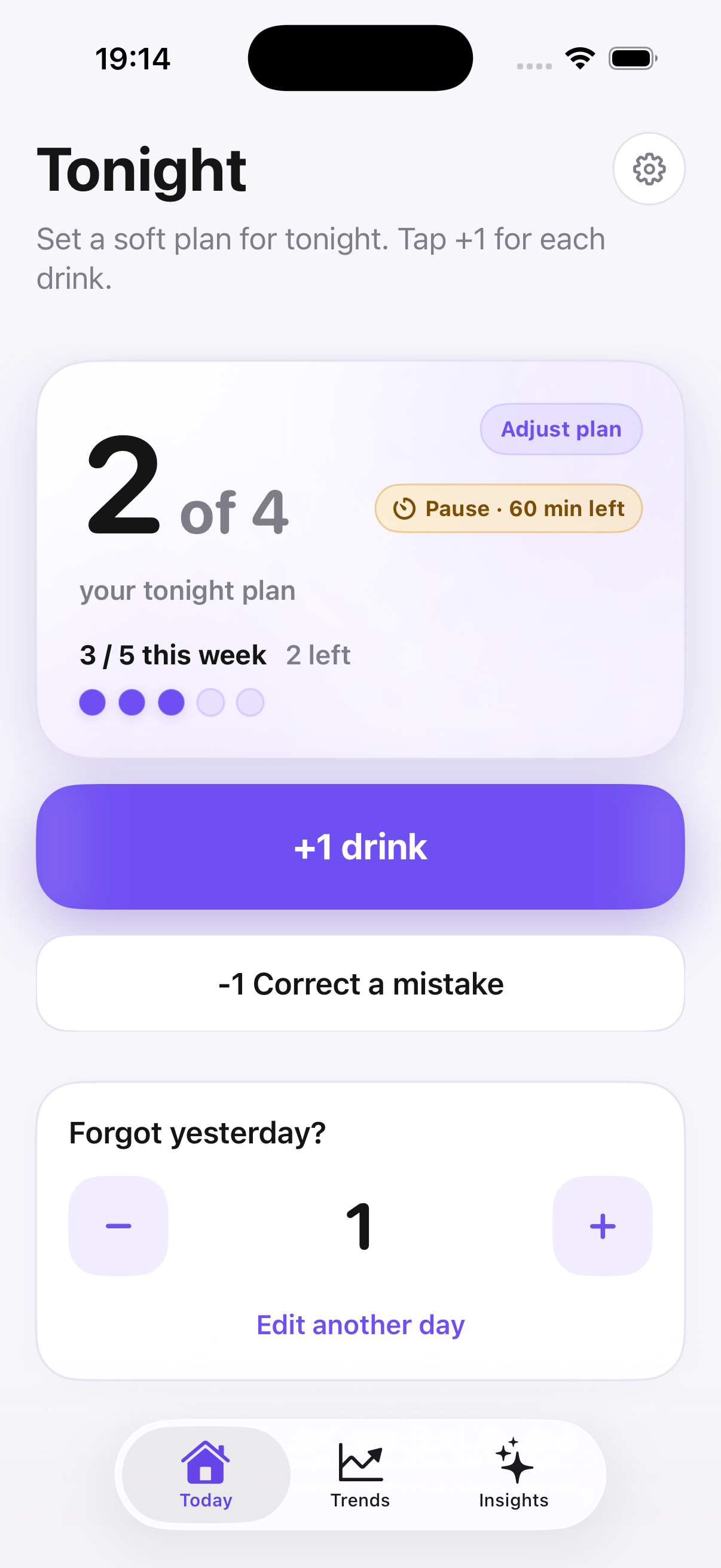
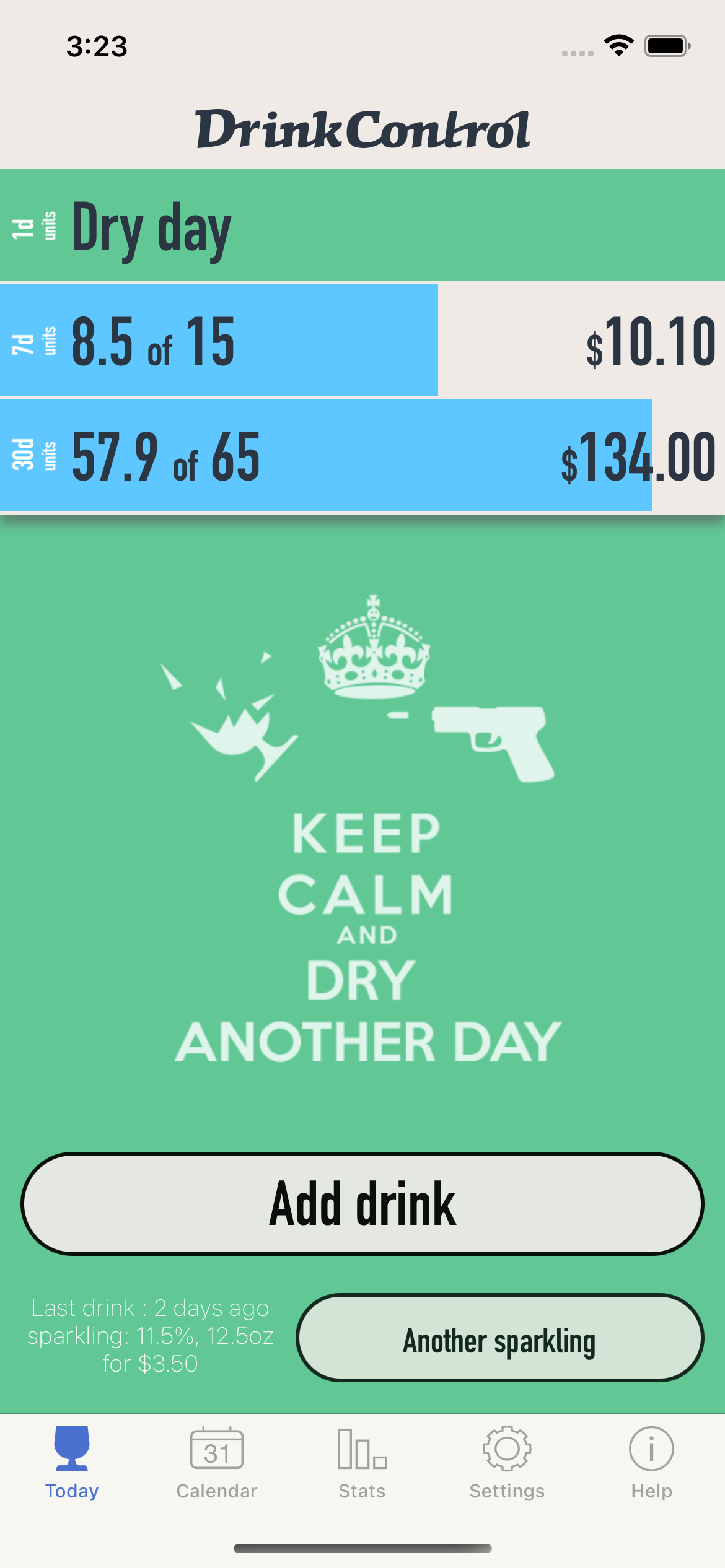
| Main purpose | A live plan, visible count, pace cue, and later trends | Detailed alcohol tracking and historical reporting |
| What you log | One drink with one tap | Drink type and data used to calculate units, calories, and costs |
| During the evening | Keeps tonight’s plan and pace close to the next decision | Helps record drinks and stay within a chosen limit |
| Reviewing later | Trends and behavioural insights | Calendars, charts, statistics, and infographics |
| Extra data tools | No ABV, calorie, cost, or export fields | Widgets, reminders, CSV export, backups, and custom drink settings are listed for premium features |
| Privacy approach | Starts without a Modero account | Says tracked data stays on the device unless you choose a backup option |
DrinkControl’s privacy policy says the app does not store or process tracked entries on its servers. That is a real strength for anyone whose main concern is local data control. The question is whether you also want the detailed fields that come with that approach.
The workflow difference is visible in the two screens: Modero keeps one current plan, count, and pace cue in view, while DrinkControl presents a detailed log with unit and cost context.
Why Modero may be a better fit
Modero is designed around reducing friction at the point where plans usually drift. A soft plan gives the evening a reference point. A one-tap count keeps it current. A pace cue gives you a pause when another drink shows up.
There are no drink types, ABV values, millilitres, calorie fields, or cost fields to fill in. That is intentional. The app is for people who would rather capture the decision than build a perfect record.
Apple Watch also matters here. If you can tap from your wrist, you may be more likely to log the drink before the conversation moves on. Later, trends and insights can show whether the same setting keeps leading to an extra drink.
If the count tends to disappear at the exact moment you need it, this guide to stopping loss of count is a useful next step.
When DrinkControl may be the better choice
Choose DrinkControl if you want a precise alcohol record. Its App Store page lists standard-drink or pure-alcohol calculations, calories, expenses, charts, calendars, custom drinks, exports, and backups. That can be the right setup when you enjoy detailed review or need to work with specific data.
It can also be a better fit if widgets, reminders, export files, or long-range statistics are central to your workflow. Modero does not try to compete on detailed measurements. It focuses on an easy count, a plan, pace, and personal pattern review.
Neither type of tracking is inherently more useful. The useful one is the record you will make at the time, and the view you will actually look at afterward.
Which one should you choose?
Choose Modero if you want to:
- set a flexible plan for tonight and keep the count visible;
- log one drink without entering detailed serving information;
- use a pace cue and Apple Watch during a social evening;
- notice patterns without turning every drink into a data entry task.
Choose DrinkControl if you want to:
- track units, calories, spending, and drink details;
- see detailed charts, calendars, and historical statistics;
- customize drinks, export records, or use its reminder and widget features;
- keep a detailed iPhone-based alcohol log.
Try one normal evening before deciding. A detailed tracker is not useful if you skip the entry when the restaurant is busy. A simple count is not enough if the details are the reason you are tracking. Start with the job you need the app to do.
Other DrinkControl alternatives and apps like DrinkControl
Modero is not the only app like DrinkControl, and not everyone looking for an alternative wants a lighter log. This guide to alcohol tracker apps for iPhone gives a wider view of the different jobs an app can do. There is no best DrinkControl alternative for everyone: choose detailed data when that changes your decisions, or choose a simpler live cue when it is the current count you need.
For a comparison of a tracker and a manual record, see alcohol tracker apps versus spreadsheets. You can also see the best alcohol tracker apps for iPhone for a wider set of options.